How to Know If Your Child Got Home (or School) Without Calling
“Did you get there?” is the question teens get most tired of and parents find most reassuring. There are ways to get the answer without asking, from the simplest to the automatic.


There's a phone call every parent knows: the one at 3:10, “Did you get there?” And a silence they know too: the teen who doesn't answer because they're with friends, their phone is on silent, or simply because they're fifteen. What you want isn't to talk. It's to know they've arrived. Here are the ways to find out without asking, from the simplest to the automatic.
1. The agreed text
The cheapest option: a quick “here” on WhatsApp when they get in. It works when it works, and it fails when you need it most: the day they forget is the day you call three times. It's fine as a first step, but it depends on the other person remembering.
2. The Find My arrival alert (if you both have an iPhone)
In Find My › People › their name › Notifications › Add, you can ask to be notified when they get home or get to school. If the alert is recurring, your child gets a notification that you've set it up and has to accept it. They know, and that's a good thing. We explain it in Find My, step by step. If either of you has Android, this option doesn't exist.
3. The Google Maps alert (iPhone and Android)
If your child shares their location with you in Google Maps, you can create alerts for when they arrive at or leave a place (up to five per person). It works across systems, but it's a hidden feature inside Maps, with no circle, no battery, and none of the rest. Family Link and Maps, explained.
4. A parental control app (for young kids)
Family Link or Qustodio have places with arrival and departure alerts. They make sense for an eight- or ten-year-old with their first phone (and, with Family Link, on Android). With a teenager, a parental control app usually creates the problem it's supposed to prevent. Qustodio, explained.
5. Arrival alerts from a family app
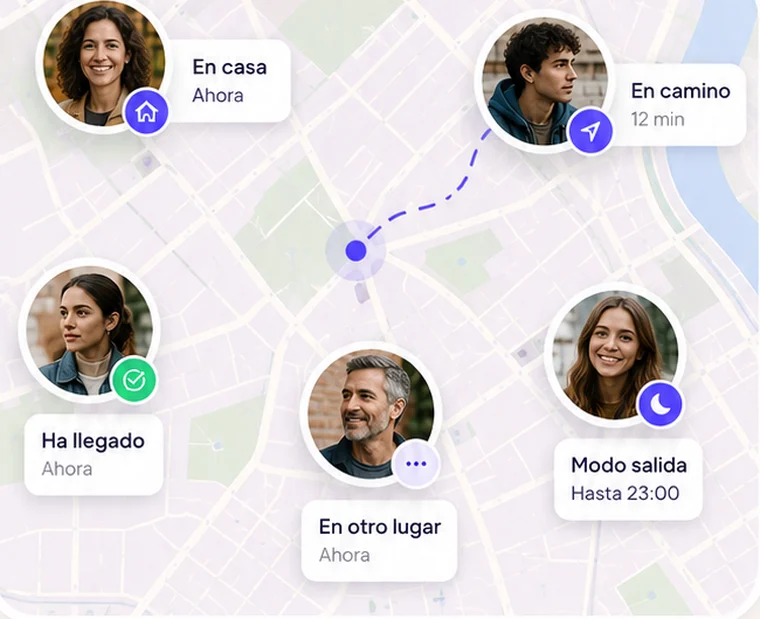
This is what they were made for. In Mi Estela you save your usual spots (home, school, grandma's house; three free) and the app automatically alerts your circle when someone arrives or leaves, without anyone opening or tapping anything. On the map, under their photo, it says “home since 3:12 PM.” And there are two details that change day to day:
- The “I've arrived” button: one tap and the whole family knows. For the day there's no saved spot (a friend's house, a birthday).
- “Let me know when they get here”: if you're waiting for someone, tap their face and ask to be told as soon as they reach where you are, without checking the map.
Alerts work when there's coverage and notifications are turned on on both phones. If their phone has no signal when they arrive, the alert goes out as soon as it reconnects. And it goes both ways: your child also gets your arrival home. That two-way design is why, in our experience, the app is still installed in March. How arrival alerts work.
What not to do
Don't install anything on their phone without telling them. As well as being illegal, they'll notice, and what breaks can't be fixed with an app. Talk about it: “I want to know that you've arrived, not where you are every five minutes.” Let them set “approximate area only” whenever they want: they'll share more, not less. And when the alert comes through, don't text them “about time.” Don't text them anything at all. That's what location and teens, without watching them is about.
Sources
- Apple: sharing your location with friends and family (notifications)
- Google Maps: sharing your real-time location (alerts)