Seniors · Family · Comparisons
Family Location Apps for Seniors: What to Look For
“I want to know my mom is okay without calling her every hour” is the phrase we hear most. The answer isn't surveillance. It's that she can say “I'm okay” with one tap and that, if one day she doesn't move, someone finds out. Here's what to look for and which app does it.


Location apps are almost always designed with teenage kids in mind. With an older person the problem is different: it's not knowing where they are (they're usually at home), it's knowing that they're okay. That changes what you should ask of the app.
What to look for
- That she can actually use it. Large text, few buttons, no menus. If saying “I'm okay” takes three screens, she won't do it.
- A one-tap “I'm okay” that reaches all the kids at once, without her having to type or call.
- An alert if she hasn't moved in many hours, one she understands and turns on herself. Without her consent it isn't care, it's surveillance.
- Video calls without leaving the app, because seeing a face reassures more than a dot on a map.
- Taking turns between siblings if there are several of you, so the same person doesn't always end up calling and nobody is left out of the loop.
- A clear SOS, with 112 (the emergency number in Spain) one tap away, knowing that no app replaces a telecare service or emergency services.
- No ads and no selling data: an older person shouldn't have to dodge advertising in a care app.
What each option does
- Find My (if the whole family has an iPhone): free and already installed, with arrival and departure alerts. It has no “I'm okay,” no inactivity alert, no large text of its own (it uses the system's), and no built-in video call (FaceTime is separate). For “where is she,” it works; for “is she okay,” it falls short.
- Life360: map, place alerts, SOS, chat, and battery status on iPhone and Android. It has no senior mode and no inactivity alert; the free plan shows ads, and its current policy states that it licenses location data to partners. Built for families with teens.
- iSharing: one of the few with an inactivity alert designed for seniors, and it has a generous free plan. In exchange, that plan shows ads and, according to its listing, location data and identifiers linked to you for third-party advertising.
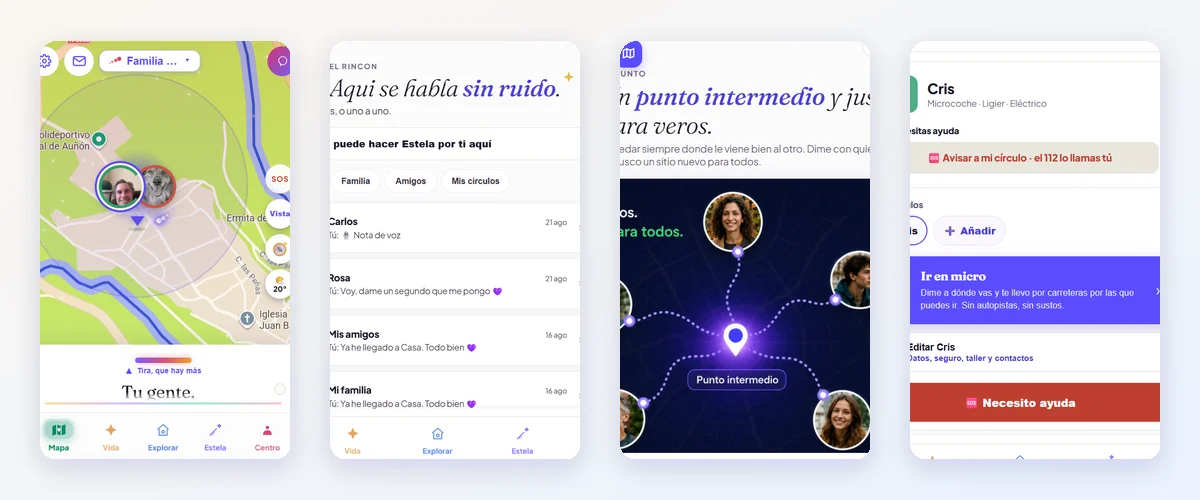
- Mi Estela: has Senior Mode (its own screen with large text and few buttons: “let my family know everything's fine,” see your people, a quick message, the video call), the one-tap “I'm okay”, the gentle check-in (if she turns it on, she chooses how many hours without moving trigger an alert and who gets it), and the Turn between siblings. Free, no ads, no selling data; iPhone and Android. It doesn't replace telecare or emergency services.
- GPS locators for seniors (a pendant or watch with a SIM and a help button): for someone who won't carry a phone or gets disoriented. They're separate from a phone and have their own subscription.
- Telecare: the public or subsidized service with a button connected to a call center that answers and sends help. It's a different thing, and complementary: telecare vs. a family location app.
How to bring it up at home
Don't install anything behind her back or “for her own good.” Sit down with her, tell her what you'll see and what you won't, and let her choose: some moms want you to see them on the map, others only want to send an “I'm okay” in the morning. Both are fine. Mi Estela for adult children of older parents and for seniors, each told from its own side.
Sources
- Apple: Share your location with friends and family
- Life360: Privacy Policy (Aug 26, 2026)
- Mi Estela: Comparison with Life360 (Oct 14, 2026)
- Mi Estela: Comparison with iSharing (Oct 14, 2026)